
- What Is Google Business Profile and Why Does a Cleaning Company Need It
- How to Create a Profile — Step by Step
- How to Choose the Right Categories
- Profile Description — How to Write It Properly
- Photos and Videos — What to Upload
- Reviews — How to Get Them and How to Respond
- Google Posts — What to Publish and How Often
- Services and Attributes — Filling Out the Services Section
- Q&A — Questions and Answers in the Profile
- GBP Analytics — How to Track Results
- 5 Mistakes We See in Cleaning Company GBP Profiles
- Conclusion
What Is Google Business Profile and Why Does a Cleaning Company Need It
Among all the search queries a cleaning company can target, the most valuable ones follow the pattern “cleaning company near me” — or something similar. These queries have massive search volume, and you can’t rank a website for them in the traditional sense. Google knows the searcher’s location and shows results from businesses that are physically close to them. This gives virtually any cleaning company — regardless of size, reputation, or history — a chance to appear in the results.
But there’s a critical detail: the first results for these searches are reserved for businesses registered in Google Business Profile. This section of the results is called the local pack. For a cleaning company, this is the single best source of leads. If you’re located in an area where people frequently search for your services — the local pack puts you directly in front of them.
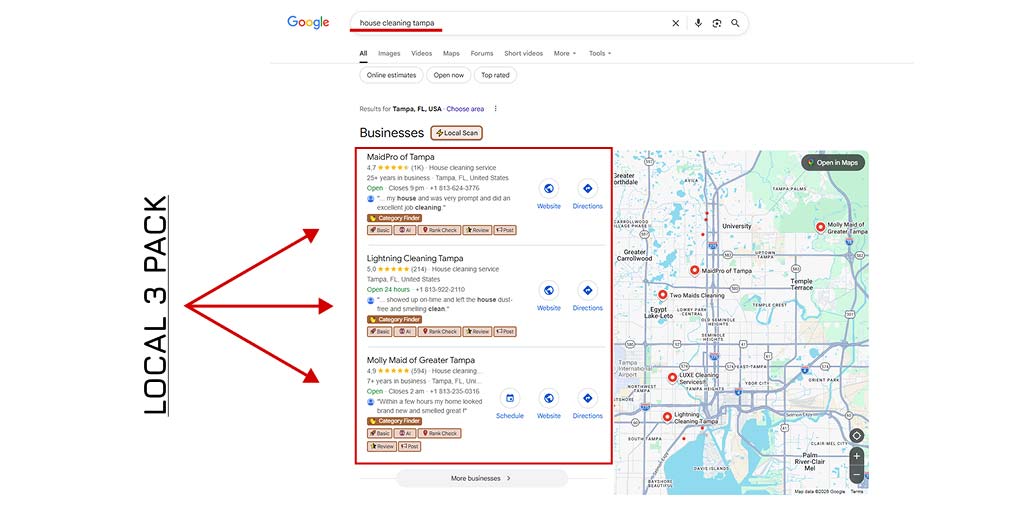
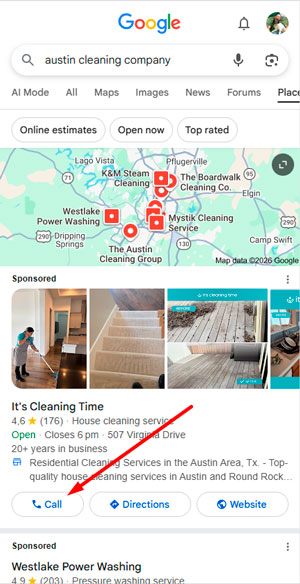
And here’s the best part: most of the clients who call you from the local pack will never visit your website. They call directly from the search results — from the phone number displayed in the local pack. That’s how powerful this placement is.
This article is a step-by-step guide to getting your cleaning company into the local pack. It’s part of our guide on 15 tips for promoting cleaning services in the US. It’s useful for cleaning business owners in the US, Canada, and anywhere Google’s local search works the same way.
How to Create a Profile — Step by Step
There’s a lot of contradictory information online about setting up a Google Business Profile. The key is not just to create a profile — but to create one that’s optimized for ranking. Below, I’ll share what actually works based on our experience promoting cleaning companies.
To start the registration process, go to: https://business.google.com/en-all/business-profile/
We’ll skip the obvious form-filling steps and focus on what matters for promotion.
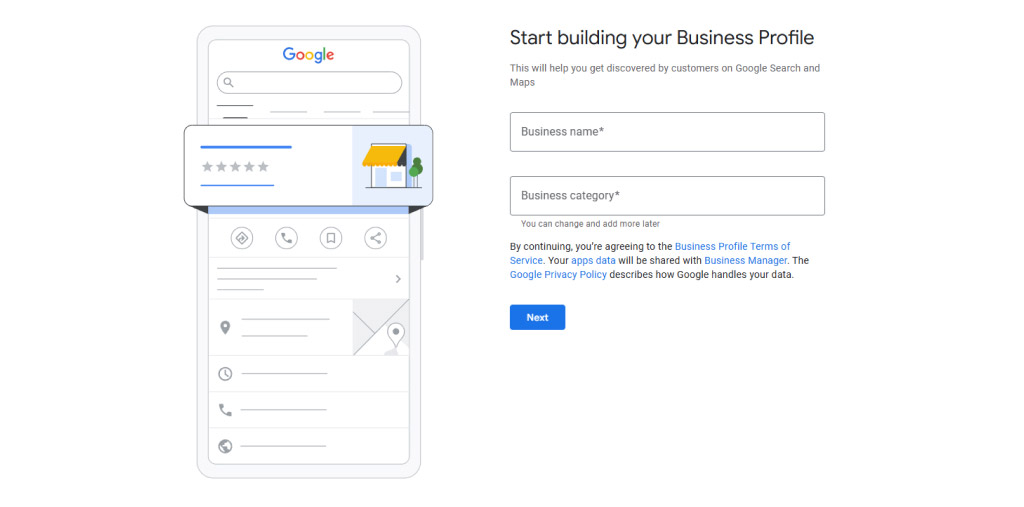
Business Name — What’s Allowed and What’s Not
Your cleaning company has a name — and naturally, you’ll want to register the name your clients already know. But in 90% of cases, profiles with a generic brand name alone will struggle to rank.
This means the name should include your industry and your location. For example: BVS Cleaning Services Portland. The structure is: brand + general keyword + geo
The “general keyword” for a cleaning business is cleaning services. You don’t need to open a new LLC for this — simply register a DBA (Doing Business As) with your state. It costs about $20 and takes 24 hours for expedited processing.
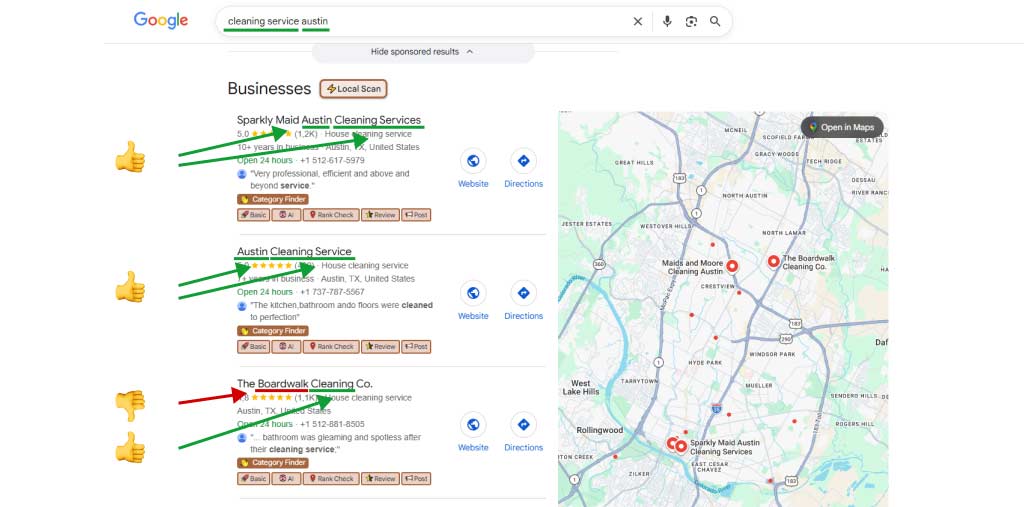
Yes, but I already have a brand and an LLC for it—what should I do with that? No worries, everything will be fine. You don’t need to open a new LLC. All you need to do is add a second name (DBA) to your existing LLC and obtain the official documents from your state department (if you’re in the U.S.). It typically costs about $20 if you need expedited confirmation within 24 hours. We’ll use that name moving forward.
Registration and Verification
The Google Business Profile verification process can be completed through several methods:
- SMS to your contact number
- Email to a domain-based address
- Live video of your location
- Phone call with a Google operator
I haven’t noticed any ranking difference based on verification method. But one insight is consistent: profiles that are verified automatically during registration (without video or phone call) tend to grow faster.
Most cleaning companies in the US register from their home address — and that’s fine. Make a sign on plastic (not paper), at least A3 size, showing your business name, phone number, and website. Let it hang for 2–3 weeks before starting verification. There’s a chance Google will detect it and simplify the verification process for you.
The sign should be:
- made of plastic (not paper)
- at least A3 size
- include: business name, phone number, and website (address is optional)
After that, proceed with filling out your profile and start the verification process. Currently, it can be completed via:
- SMS sent to the provided phone number
- Email on your domain
- Live video recording of the location
- A call with a Google representative
I haven’t noticed any difference in ranking performance based on the verification method. However, one insight I can confidently share: listings that get verified automatically (without video or a call) tend to grow and rank faster.
One more important point—if you’re unsure about any information during registration, don’t worry. You can even leave some fields blank. Everything can be adjusted later in your business profile settings.
How to Choose the Right Categories
This is one of the most important settings in your profile — second only to the business name. Google Business Profile categories define what your business does and signal your relevance to search queries. Wrong categories (or empty ones) are an anchor that drags your ranking down.
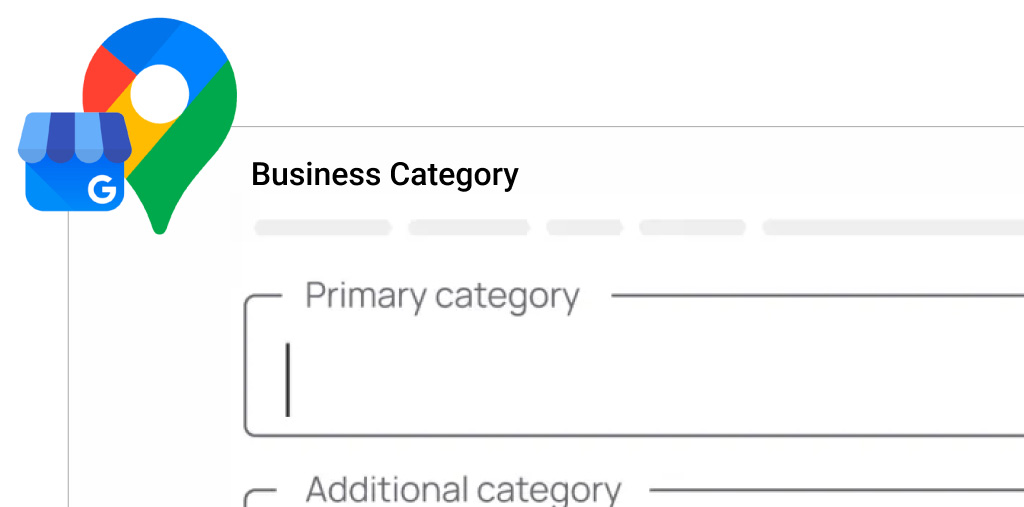
Primary Category
This is the single most important setting. And because your profile performs best when linked to a properly optimized website, the primary category keyword should match your site’s main keyword.
For a cleaning company, the primary category is: House cleaning service.
Google occasionally changes category names. For established profiles, changes are applied automatically. For new ones, you may need to find the closest match in the current list.
Additional Categories
I always recommend analyzing your competitors’ profiles to see which additional Google My Business categories they use. Apply common sense — only add categories that match services you actually provide. A typical set might include:
- Cleaning service
- Janitorial service
- Upholstery cleaning service
- Foreclosure clean-out service
Profile Description — How to Write It Properly
There are many recommendations out there, but I rely on a highly authoritative source: https://whitespark.ca/local-search-ranking-factors/ — a collective analysis by a large group of local SEO specialists. Based on the Google Business Profile ranking factors that actually matter, here’s what I recommend:
Don’t over-optimize or count keyword occurrences. Just write naturally, but make sure the information is as complete as possible.
That will be enough to boost our profile on GBP and get you more leads!
Photos and Videos — What to Upload
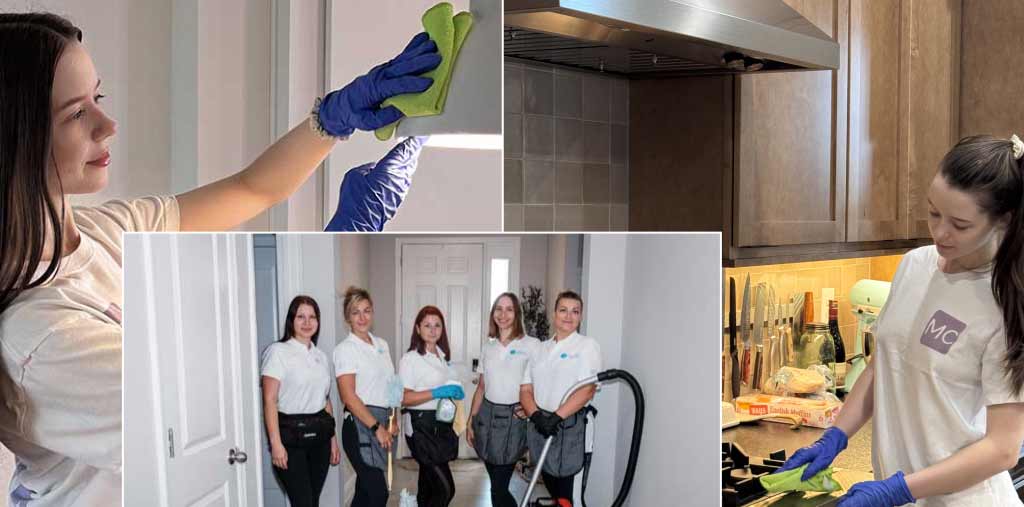
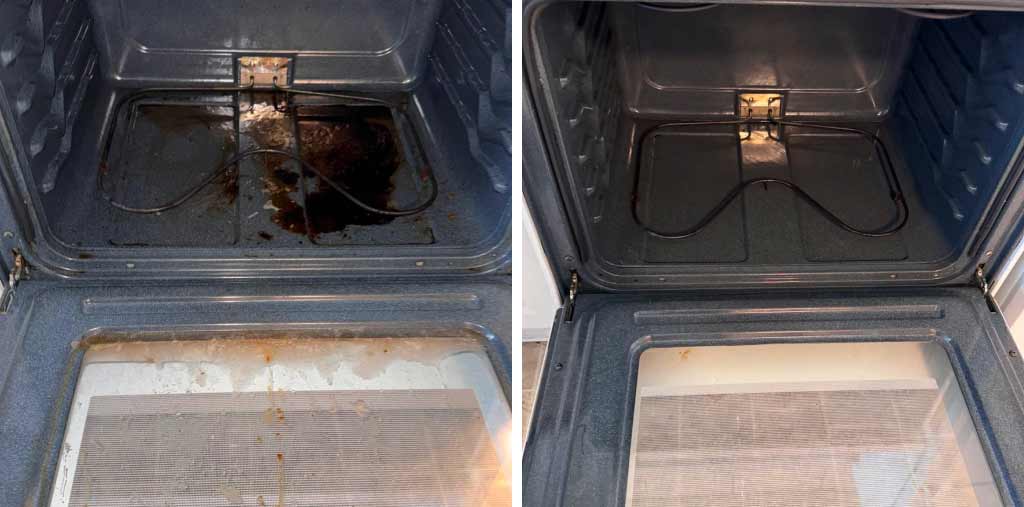
There are many different opinions about using photo and video content to promote cleaning services. But I’ll offer some advice based on my own observations.
Required Minimum
For new profiles, upload photos at least once a week. More is better.

Geo-tagging Photos
Many sources online recommend adding EXIF tags with location data to your photos. But here’s the truth:
Video
Video isn’t a primary ranking factor, but it’s a strong supporting signal. Use short clips — reels, quick cleaning hacks, or footage from job sites. Brand them as much as possible. Tie your video content to your company’s identity.
Reviews — How to Get Them and How to Respond
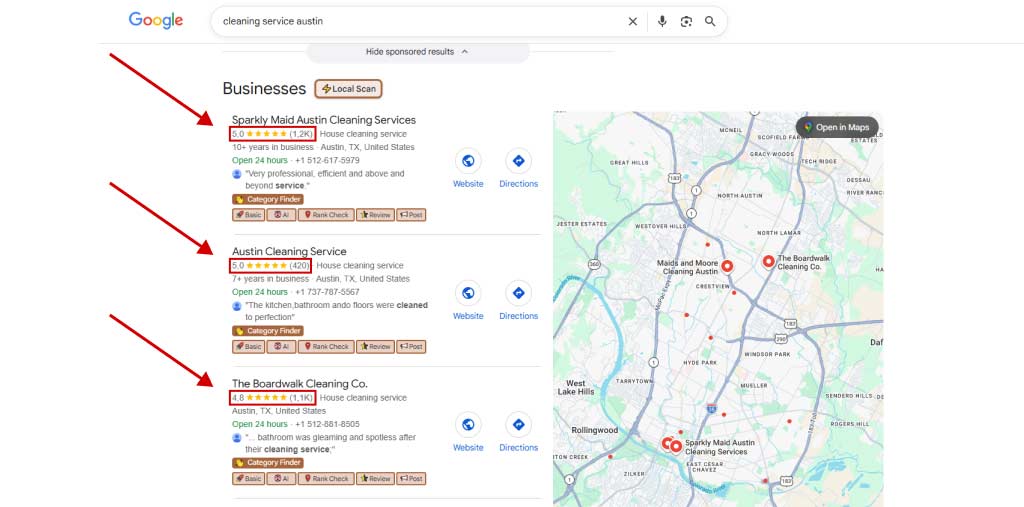
Google Business Profile reviews are one of the strongest ranking signals for local search. Current data shows that top-ranking cleaning companies have 100+ reviews with an average rating of 4.8. A lower rating can significantly reduce your visibility.
From our experience: an active business can collect about 100 reviews in 3 months. This should be a priority from day one.
How to Ask Clients for Reviews
The most effective approach is to build the review request into your business process. Cleaners should be motivated to ask for a review on-site, immediately after the job. To make it easier for the client, offer a small discount on the current job or a significant discount on the next one. In the US, many clients are happy to leave a 5-star review even for a $10 incentive.
How to Respond to Reviews
I don’t believe review responses significantly impact ranking. But from a branding perspective, respond to reviews promptly. It shows clients that their feedback matters — and potential clients will see that you’re engaged.
Google Posts — What to Publish and How Often
Posting is important for promotion, but it serves two distinct purposes:
- Google Posts (posts within your GBP profile) — signal that your business is active and current
- Directory posting (external catalogs like YellowPages, Yelp, etc.) — updates your NAP (Name, Address, Phone) across the web
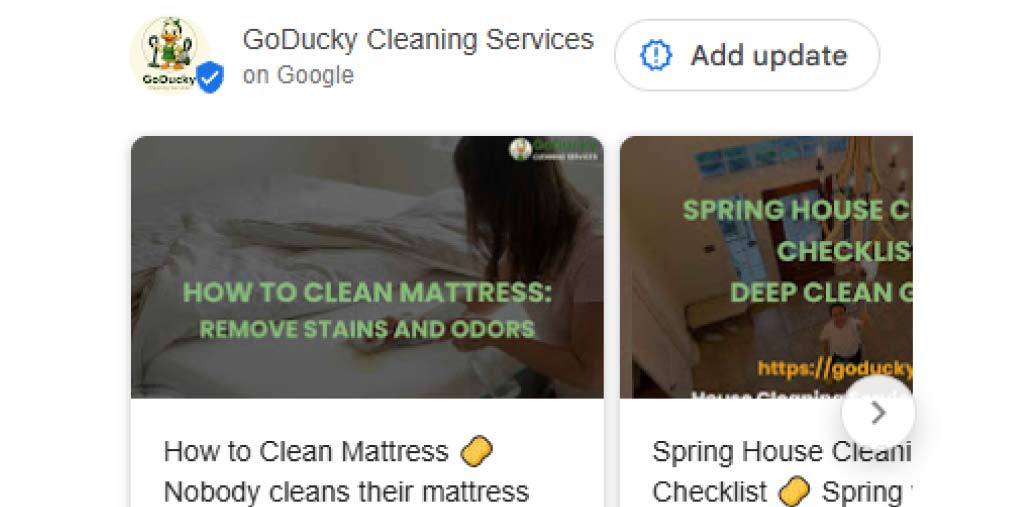
For Google Posts, the main goal is to keep your profile’s “freshness” signal alive. Recommended frequency: at least once every 7 days. If the gap grows longer, visibility can drop — especially for newer profiles.
Directory posting has a different purpose: it ensures that your business information is consistent across the web. Google uses this consistency as a ranking signal. From our experience, sometimes new profiles start receiving leads immediately after a NAP update across directories — that’s how significant this signal is.
The best tool for directory posting is Uberall — the fastest NAP update service. Its main drawback: it’s not built for small businesses and can be expensive. Alternatives include:
- Manta — never link Manta to your GBP, as it can corrupt your categories with no easy way to fix it
- BrightLocal — a comprehensive platform with NAP management as one of its features
As for Manta—never connect this service to your GBP listing. It can mess up your business categories and doesn’t provide a way to remove the connection (only through support). That’s its main drawback. BrightLocal is a comprehensive platform, and NAP updates are just one of its features. Updates usually happen pretty quickly, and you can control which directories to include by selecting the ones you need. However, the software isn’t cheap. From experience: all of these tools work and do what they’re supposed to do.
Services and Attributes — Filling Out the Services Section
List all services your company provides and fill out each field as completely as possible. Don’t invent services you don’t offer — just write what you actually do. While the services section may not directly improve visibility, it matters when a potential client is evaluating your company before making a call.
Q&A — Questions and Answers in the Profile
The Q&A section has been deprecated. As of 2025, Google removed it from the profile settings. There’s nothing to optimize here — it no longer functions.
GBP Analytics — How to Track Results
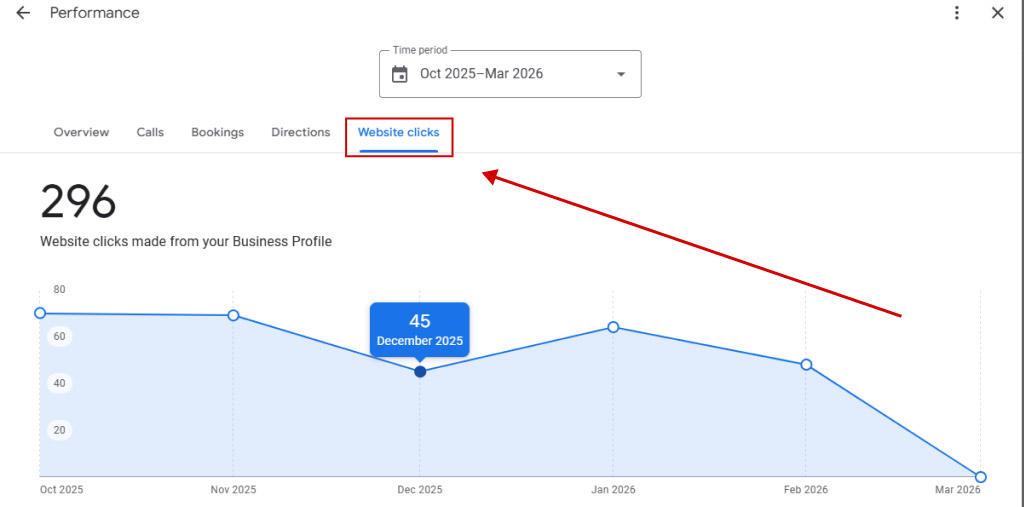
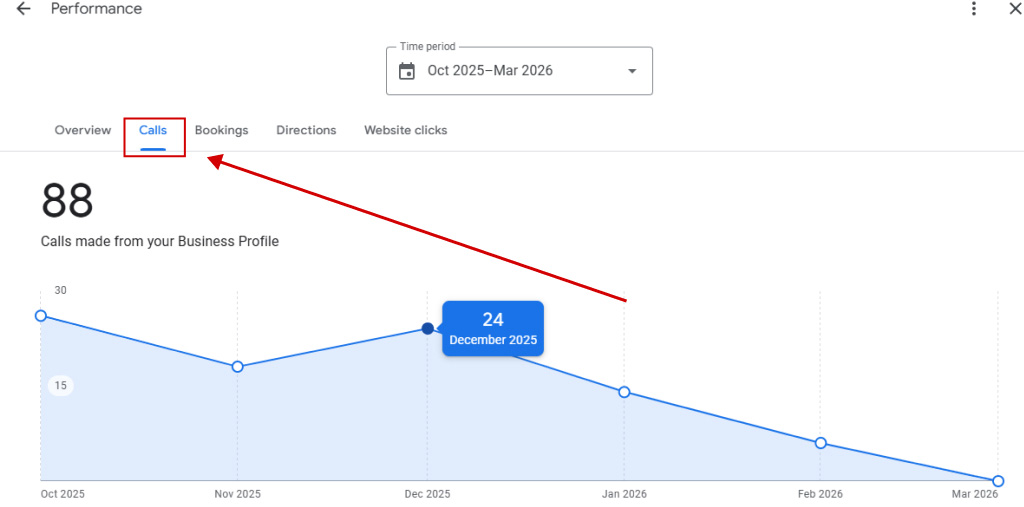
As a cleaning business owner, you’ll want to track two key metrics from Google Business Profile insights:
- Calls — people who called directly from the profile or search results, without visiting your website
- Website clicks — people who clicked through to your site
An important observation: in some markets (depending on the state), the audience tends to call directly. In others, people prefer to visit the website first, review the company, and then call or submit a form. Both metrics matter. GBP traffic converts exceptionally well — in some locations, conversion rates from GBP traffic reach levels you won’t see from any other channel.
5 Mistakes We See in Cleaning Company GBP Profiles
GBP is just one of the marketing channels. We discussed the full strategy in our article: cleaning business promotion — the complete guide
Conclusion
There’s nothing complicated about creating, verifying, and setting up a GBP profile for a cleaning company. The main recommendations in this article are based on my personal experience promoting cleaning businesses in the US and Canada (take a look at this guide as well — 15 tips for promoting cleaning services in the US — it will be useful for you too). I’m confident that if you follow everything in this article, success will follow. I sincerely wish you that! I’m happy to answer any questions. Good luck with your promotion!

My specialty is promoting service-based websites. I have solid expertise and a strong portfolio of SEO and Google Maps (local SEO) case studies across a wide range of industries, primarily in Home Services. Here, I share my case studies and insights. I’d really appreciate your comments and feedback!