
It’s a situation thousands of business owners in the US know all too well. You open your GBP Dashboard — and see the status: “suspended.” Panic. Customers can no longer find you on the map, calls drop, leads go to zero — your source of free leads for your local business has simply stopped existing.
Most articles online explain what to do AFTER your Google Business Profile gets suspended. And the advice is usually trivial. Here you will find the official documentation from Google Support. I want to share something different — insights from hands-on experience. These are the recommendations I follow myself, and they work. Understanding them starts with understanding how Google Maps promotion works at the system level.
Why Google Suspends Business Profiles
When Google suspends your profile, it never tells you the reason. You receive an email saying the status of your listing has changed. That’s it. In my opinion, this is not constructive — if the listing is suspended, tell us why. It would be logical. But no.
This means we can never be 100% certain what actually caused the Google Business Profile suspension. What matters is not just the fact that the listing stopped working — but understanding what we need to do to get Google to restore it. And to figure that out, we need to dig into the details.
How the Suspension Process Actually Works
This is the most important section of the entire article. Because once you understand HOW the system suspends listings, you can — to a significant degree — prevent it from happening.
Here’s what’s critical: you need to know how your listing was verified in the first place. There aren’t many options:
- Automatically — Google approved it immediately upon creation. This is rare, but it happens.
- Email or SMS verification — also happens, but typically triggers the third verification type.
- Video verification recorded in the GBP system — about 70% of listings are verified this way.
- Live video call with a Google manager — this option is rarely available.
Why does this matter? Because practice has shown that the type of verification your listing went through directly determines the reasons for a potential suspension.
What You Need to Know About GBP Verification Processes
To keep this simple, here’s the essential distinction. From Google’s side, a listing can be verified through two fundamentally different processes:
Automated verification — the system analyzes the listing without human involvement. Based on its checks, the listing receives a status: passed or not. This type has advantages: if you know what and how the system checks, you can “guide” its work toward a positive outcome. But it has a major downside: the system inherently distrusts listings that passed automated verification. It can trigger a re-verification at any time. And here’s the critical part — if your listing passed the first check and the system launches a re-verification after receiving a signal, in 90% of cases the listing will NOT pass the second time. I’d even say the opposite: re-verification almost always results in suspension.
Manual verification — a Google manager sets the verification status. The advantage is enormous: the system trusts these listings very strongly. Listings confirmed through manual moderation are extremely stable. After manual verification, the system will never trigger an automated re-check. This is incredibly valuable for both SEO specialists and business owners. The downside: this type of verification is not available through the standard listing creation tool. You need specific grounds to initiate it.
Now, here’s the practical breakdown:
- If your listing was verified through methods 1 or 2 (automatically, email, or SMS) — it was verified automatically. Any change to significant profile settings will trigger a re-verification, which it will not pass.
- If your listing was verified through live video recording (method 3) — the probability of automatic re-verification drops significantly, but doesn’t disappear. I’d estimate: 50% chance it could be sent for re-verification. If it is — the listing will be suspended.
- If your listing was verified through a live video call with a Google manager (method 4) — the listing will NEVER be sent for automated re-verification. This means any settings changes will either be approved or rejected — but without suspending the listing.
What Actions Lead to a Suspended Status?
Now that we understand when a listing can be sent for re-verification, the next question is: what specific actions trigger it?
I want to emphasize: in this article, I’m not covering the trivial issues described in Google’s official guidelines. I’m talking about what business owners actually encounter when doing Google Maps SEO in practice.
It’s not hard to understand that for the system to launch a re-verification of your listing, you need to give it a significant reason. What could those reasons be for your GBP profile?
- Adding UTM tags to the website URL
- Anything related to NAP (name, address, phone, website URL) can trigger automatic re-verification
- Changing the primary category or additional categories
Important caveat: If the listing has existed for a long time (several years), has a history (posts, reviews, user activity), it will NOT be suspended when you change core attributes. Google has established trust with that listing.
What to Do If Your Listing Gets Suspended
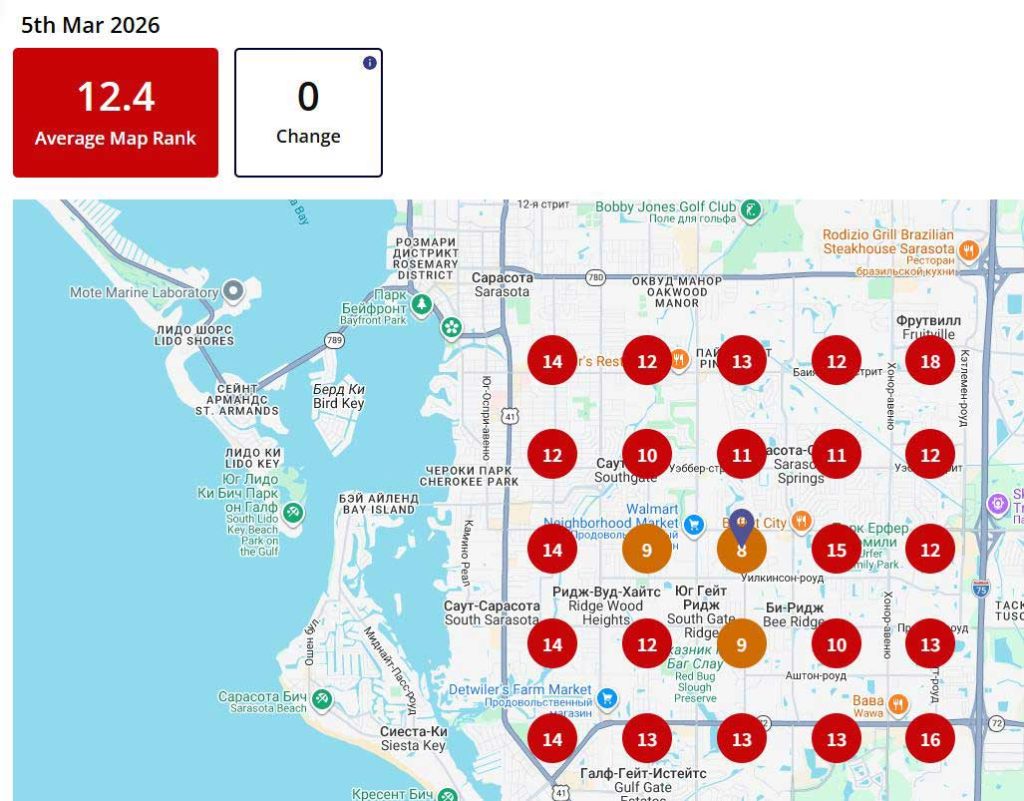
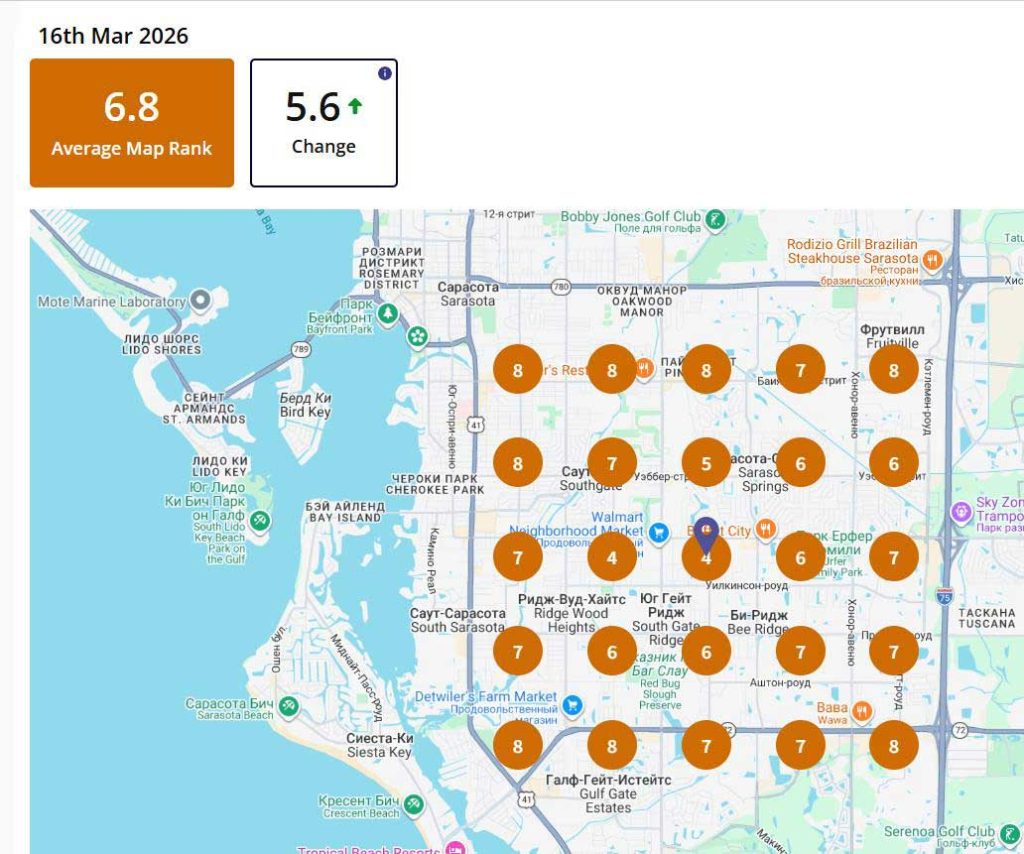
In reality, there’s nothing about a suspended Google Business Profile that can’t be resolved. In fact, I’ll go further — in our practice, listings that were suspended and then reinstated often received an additional ranking boost. Why? My hypothesis: the appeal process goes through manual review. So by successfully completing it, you get a more trusted listing with higher confidence from Google. Hence the improvement in average position. We’ve measured this across clients — positions before and after suspension consistently show growth.
GBP Reinstatement Request — Step by Step
Here’s our process when a listing is suspended:
- Provide documents that unambiguously confirm ownership of the business name. For example, your LLC registration. If you don’t have one — file a DBA (Doing Business As) for the required name.
- Provide documents confirming that the address is associated with your business name. This can be: a lease agreement or rent payment receipts.
- In most cases, these two documents are sufficient for a successful appeal.
Example: Let’s say the business owner’s name is N. A sufficient package would be: LLC documents showing N as the owner, plus a lease agreement for the listed address showing N as the tenant. In 99% of cases, the GBP reinstatement will be approved. This typically takes up to 14 business days.
What If Your Appeal Is Denied?
There are plenty of nuances, as the specifics of each situation can significantly affect the appeal process. For example:
- No documents confirming the business operates at the listed address
- No documents confirming your relationship to the brand name
- The system requests re-verification through video recording, but you have no signage at the address because the business has already moved
All of these circumstances need to be handled individually. There can be many variations. But the fundamental principle always holds:
If you can do that — if the business is real and legitimately connected to the address — no circumstance can prevent a successful appeal. And as a bonus, you may even get a ranking boost after reinstatement.
If the standard appeal fails, here are the escalation options:
- Resubmit with additional supporting documents (utility bills, business license, photos of signage)
- Contact Google Business Profile Support through the GBP help center chat
- Escalate via the Google Business Profile Community Forum
- Reach out on social media (@GoogleMyBiz on X/Twitter)
- Last resort: creating a new profile — but this carries its own risks (loss of reviews, history, and trust)
How to Prevent GBP Suspension — What I Recommend
Based on everything above, here’s the approach I use and recommend to all clients working on Google Business Profile optimization:
If your listing is new and was verified automatically — do not touch the core settings. Let the listing build history, accumulate reviews, and establish trust. Only then make changes, gradually and one at a time.
Aim for manual verification. If you have the option for a live video call with a Google manager — always choose it. This gives your listing maximum stability.
If manual verification isn’t available — go through video verification (method 3) and then avoid changing NAP, categories, or website URL for at least 6–12 months.
Build trust before making changes. A listing with 50+ reviews, consistent posting history, and steady user engagement is far more resistant to re-verification triggers than a fresh listing with 3 reviews.
GBP Best Practices — Suspension Prevention Checklist
- Business name = legal name exactly as registered (no keyword stuffing)
- Address is real, verifiable, and can receive mail
- Primary and additional categories match actual business activities
- Photos are real — not stock images, not geotagged from a different city
- Reviews are organic — no purchased bursts or sudden spikes
- One profile per physical location — no duplicates
- Website URL is clean — no UTM parameters in the GBP link
- Do not change NAP, categories, or website URL on new listings without established trust
- If you need to make changes — do them one at a time, not all at once
- After any change, monitor the listing status for 48–72 hours before making the next one
FAQ

My specialty is promoting service-based websites. I have solid expertise and a strong portfolio of SEO and Google Maps (local SEO) case studies across a wide range of industries, primarily in Home Services. Here, I share my case studies and insights. I’d really appreciate your comments and feedback!