
Advertising on Google Maps is set up using Google Local Services Ads. This service is extremely popular among local business owners due to its efficiency: you buy customer contacts — no payment for clicks. But you can truly feel the power of this tool when its work is combined with other channels that drive promotion on Google Maps. Let’s break it all down in detail!
Four Channels for Promotion on Google Maps
There are four channels for promoting a local business on Google:
- Local pack in the SERP. Simply put, this is where your GBP location appears in search results when a user searches by a keyword query.
- Organic local results — this is the local ranking of your website. Simply put, this is your website’s position in the search results.
- Google Ads — this is paid PPC advertising (pay-per-click). You pay for clicks. Here, Google can advertise both the website and the place — the GBP location.
- Local Services Ads — this is also a paid advertising tool. But unlike Google Ads, you pay not for traffic, but for a lead (a customer) — PPL (pay-per-lead). The service provides a potential customer’s contact. If this contact is not targeted — Google refunds the spent funds.
What Is Local Services Ads
As we can see, Google has two paid channels — Google Ads and Local Services Ads (LSA). But they are fundamentally different both in how they work and in payment. What’s important to understand: Google Ads and Local Services Ads are two different tools. The fundamental difference in their operation is that Local Services Ads is pay-per-lead (call/message), not pay-per-click.
It’s also important to understand that an ad in LSA is displayed at the very top of the SERP. And, in my opinion, this is one of the main factors of its effectiveness.
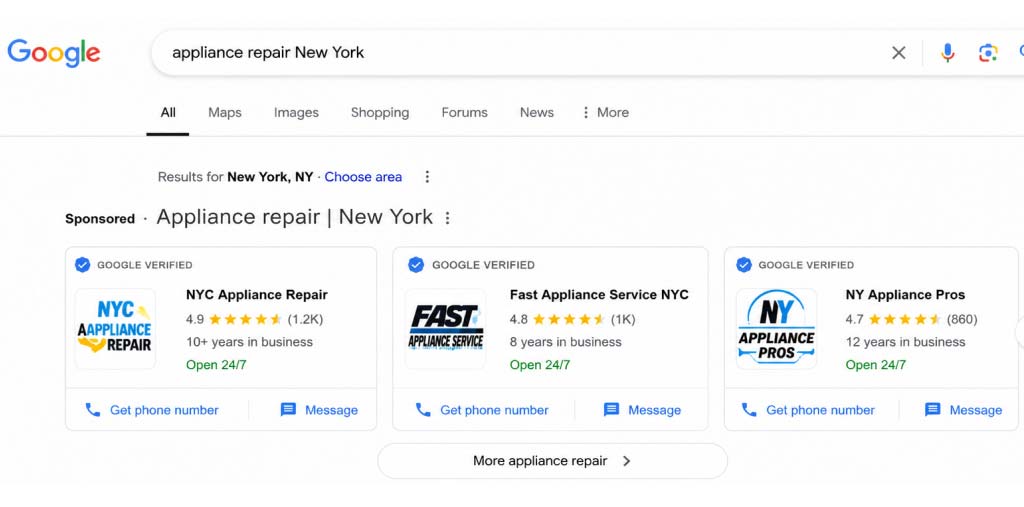
Google Local Services Ads is a direct lead generation channel for local business in the USA, Canada, and several European countries. The ad is shown in the first position of the search results, above all other results, with a blue Google Verified badge, a rating, and a call button.
Google Verified Badge — What Has Changed in 2025–2026
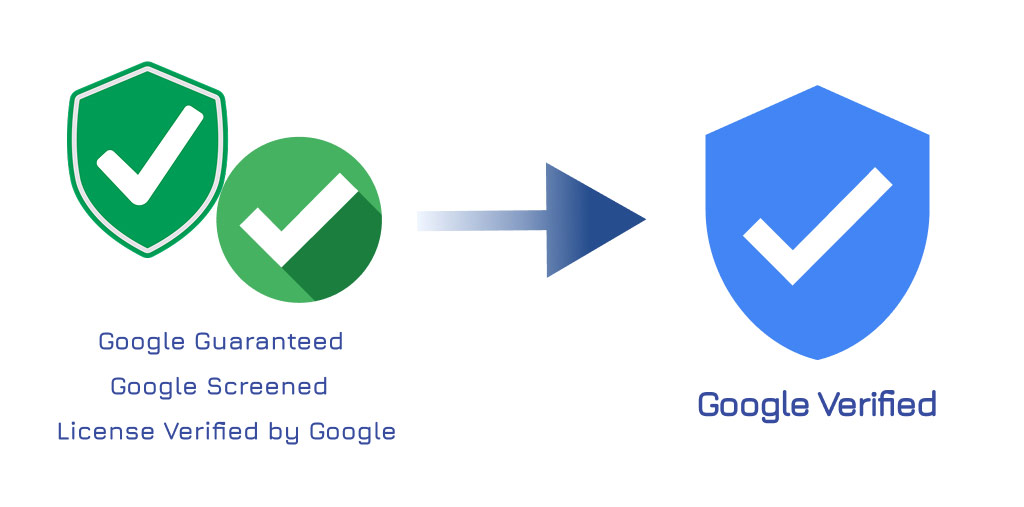
Previously, businesses in Local Services Ads had three different trust badges available to obtain, each for its own category:
- Google Guaranteed — for home services (with a money-back guarantee to the customer up to $2,000)
- Google Screened — for lawyers, financial consultants, and healthcare
- License Verified by Google — for individual categories with licensing requirements
On October 20, 2025, Google merged all three into a single badge — Google Verified, with a blue checkmark. For existing LSA accounts, no action was required — the transition happened automatically. All reviews, verifications, and status were preserved.
Cancellation of the Money-Back Guarantee
On November 7, 2025, Google closed the money-back guarantee program. This was the financial guarantee program that previously came with the Google Guaranteed badge. This is one of the most significant changes in LSA over the past two years.
What did the program mean for businesses and customers?
- Before November 2025, customers received additional insurance from Google, not just from the contractor (business).
- If the work was performed poorly (substandard work), the customer could submit a claim to Google and receive a refund of up to $2,000.
- For businesses, this program was an additional argument when being hired by a customer.
- For customers — additional confidence that they were not taking a risk.
However, in practice, the program was rarely used and was expensive to administer. There are likely other reasons for the closure as well, but Google’s official comments are quite modest. After the closure of the program, Google no longer bears any financial obligations to the customer. And the Google Verified badge now only means that Google has verified the business’s license, insurance, and reputation.
GBP and LSA Connection — A Mandatory Requirement
Since November 2024, LSA does not launch without a linked, verified Google Business Profile account. Previously, the link was optional. If the GBP is unverified, incomplete, suspended, or deleted — LSA advertising stops automatically. If this is your case and you see your profile status as “suspended” — check out our article about this problem: GBP profile suspension — how to restore the profile.
How Google Ranks LSA: Factors in 2026
LSA is not an auction like Google Ads. The search engine’s algorithm weighs several factors, and a large budget is not a guarantee of getting top positions. A hypothetical business with a budget of $800/month, a rating of 4.9, and 85 reviews (and getting them regularly) can easily outperform a competitor with a budget of $2,500 but a weak GBP profile. So, here is the hierarchy of factors in order of importance:
1. Proximity — closeness to the user
No matter how well-developed the profile is, the main factor will always be proximity to the user. Google’s algorithms are set up in such a way that the search results will give priority to companies located near the user. Example: if your address is in Manhattan, a competitor is in Brooklyn, and a user enters a query in Brooklyn — the competitor will get the impressions, even with a smaller budget.
Practical conclusion: it’s useless to set a service area the size of a state. A realistic zone is 15–25 miles from the physical address. Distant customers will still see competitors who are closer.
2. Reviews — reviews and GBP rating
Only Google Business Profile reviews work in LSA — since 2025, the separate LSA review system has been turned off. The algorithm considers four parameters:
- Quantity — the competitive minimum for most markets is 25–50 reviews.
- Average rating — no lower than 4.0, optimally 4.5+ (in our experience, no less than 4.8).
- Recency — fresh reviews are more important than old ones. One to two reviews per week on a regular basis works better than 20 reviews in one week and then silence.
- Response rate — owner responses to reviews. Aim for 100%, especially on 1–3-star reviews. The speed of response is also important — try to respond within 24 hours.
- Review velocity — a steady inflow of 4–8 new reviews per month is a separately strong signal. An inflow of reviews shows the system that the company is active. The algorithm also considers active profiles more reliable than “frozen” ones with a large number of old reviews.
3. Responsiveness — speed of response to leads
An extremely important factor for already-active accounts. Google measures how quickly you respond to calls and messages. The goal: respond to a lead within 5 minutes, not hours. A business that misses up to 30% of calls or responds after several hours drops in the ranking, even with an excellent rating.
Businesses often use AI dispatchers because it’s cheaper. But you need to be extremely careful — people don’t like talking to them, and orders are often lost.
4. Business hours — open right now
The “open now” status at the moment of the search gives an advantage. The more hours per week your business covers, the more impressions it receives. For emergency categories (plumbing, locksmith, water damage), 24/7 is practically mandatory for competitive ranking.
5. Profile completeness
Filled-in categories, a detailed service description, photos of the team and real work, current hours, a list of all job types for which you have a license. Every unfilled item is a missed signal for the algorithm.
6. Budget
Budget affects the frequency of impressions, but does not override the other factors. A high budget with a weak profile is simply spent faster on expensive non-targeted leads. A low budget with a strong profile provides a stable flow of high-quality leads.
Targeting is managed through service and area settings, not through keywords. This is a fundamental difference from regular Google Ads.
What You Need to Launch LSA in the USA
Checklist for 2026 — what to gather before submitting an application
- Business entity form: LLC registered in the state of operation (a DBA will also work)
- Employer Identification Number (EIN) from irs.gov (free, 15 minutes online)
- General business license — state and/or city, depending on the niche and location
- Trade-specific license — required for plumbing, HVAC, electrical, roofing, pest control, locksmith
- Insurance (General Liability Insurance) — minimum $300–500K, standard for home services $1M/$2M
- Workers’ Comp insurance — when officially hiring W-2 employees (required in most states)
- Background check — for the owner and all technicians/workers through Evident or Pinkerton
- Verified GBP — with 5+ reviews, average 4.0+, with no “suspended” status (suspensions)
- Corporate email — on the business domain, not a personal Gmail
Launch Timeline
From submitting documents to an active campaign — 1–4 weeks, depending on the workload of Google’s verification team and the speed of passing background checks:
- License and insurance are checked in 3–10 days.
- Background checks — a separate point of delay: if even one technician drags out the process — the account is not activated.
For some categories — lawyers, healthcare — verification is more complex and takes longer. Lawyers need confirmation of Bar admission in their state, doctors need the corresponding medical licenses and professional liability insurance (malpractice insurance). Allow 4–6 weeks for verification instead of the standard 2–3.
Starting Budget
There is no minimum for LSA, but a realistic start is $500–$1,200 per month for home services on average. Less — the campaign doesn’t receive enough data for optimization, the algorithm doesn’t have time to learn. More at the start without statistics — the money is spent inefficiently.
Service Area and Job Types
Two settings on which beginners regularly lose money:
- Service area: don’t choose the entire state. A realistic zone is where you can drive within 30–45 minutes.
- Job types: include only those services you definitely perform. Since 2025, Google no longer returns credits for “job type not serviced” — you pay for every such lead.
Changes in ToS — Call Recordings
With the April 2025 Terms of Service update, Google claims rights to call recordings and transcripts from LSA leads. This means that recordings of conversations with your customers may be used by Google for training models and improving the quality of the system. For most businesses, this is not a problem, but for categories with sensitive information (legal, medical), it’s worth considering in your work with customers.
Mistakes When Working with LSA
Seven typical mistakes on which businesses lose money in the first months:
- Slow response to leads. A response longer than 5 minutes means a loss of ranking and loss of the customer (they are already calling a competitor). This is a critical parameter.
- Service area covering the entire state. The budget is spent on leads 60 miles away that cannot be served profitably. The algorithm considers such advertisers less relevant and lowers them in search results.
- Inaccurately configured job types. Including all possible options “just in case” — you pay for non-targeted leads. Google has not returned credits for “not serviced” since 2025.
- Pausing the campaign. Any stop is an algorithm reset. After resumption, 2–4 weeks are needed — the campaign is again in the learning phase, with fewer leads and higher CPL. It’s better to reduce the budget than to fully pause.
- Review manipulation. Buying reviews or using gray methods → GBP suspension → automatic LSA stop with frozen budget. A direct path to losing 30–90 days of work.
- Ignoring automated credits for invalid leads. Since 2025, Google does not return credits for services you do not provide or from areas in which you do not work. Solution: in the initial setup, specify only the services you actually provide, and set a realistic service area (not the entire state, but 15–25 miles from your address).
- LSA without a strong GBP. If the GBP is empty and without reviews — LSA works much worse. These channels reinforce each other, not replace each other. Run both in parallel.
Smart Campaign often burns through budget: impressions on irrelevant queries, no filtering by job type, payment for clicks rather than for leads. LSA is set up through: ads.google.com/local-services.
How Much Does an LSA Lead Cost
The cost of a lead in LSA is influenced by many factors, starting with campaign settings and the quality of your GBP profile, and ending with geo, seasonality, and business category. Keep in mind that the figures presented below are averages. That is, for large cities with high competition, they can roughly be multiplied by 1.5, and for smaller cities — divided by 1.2–1.5. Also, strong CPL fluctuations can occur during the “high” season for specific services in a specific geo.
Average cost per lead (CPL) for home services: $53. Compared to Google Ads: LSA is 49% cheaper ($53 vs $104).*
Table: Comparing Cost per Lead in LSA and Google Ads
| Category | CPL (Google LSA) | CPL (Google Ads) |
|---|---|---|
| HVAC | $51 | $100 |
| Plumbing | $57 | $117 |
| Electrical | $39 | $76 |
| Drain/sewer | $59 | $115 |
| Roofing | $50–$95 | $98-$186 |
| Cleaning | $15–$35 | $29-$68 |
*Data: February 2026, 888 contractors, $6.72M in spend. You can see the full article here.
CPL grows significantly during seasonal demand peaks — up to 2–3 times. Each business category and location (region) has its own high-demand season.
How to Evaluate CPL for Your Business?
The logic is simple. Look at CPL relative to the average ticket. For example: if you have appliance repair with an average ticket of $400 and a CPL of $30–$40 — that’s excellent.
LSA vs Google Ads vs Organic SEO — When to Use What
At the beginning of this article, we mentioned that there are four placements from which a customer can interact with the business. All of them are within these channels:
- organic search (organic local results and local pack)
- contextual advertising in Google Ads
- LSA — Local Services Ads
The question arises: what should you choose for your local business’s promotion, and which of the channels will be the most effective? Let’s break it down in order.
1.SEO organic traffic
For local business, unlike national business, the key role in promotion is played not so much by the website as by the Google Business Profile location. Why? One of the main reasons is the structure of local search results — the SERP. The point is, as we already said, that the top of the page is occupied by the LSA block, and in second place is the local pack, that is, the ranking of the GBP location. And only after that comes organic — websites. Even having TOP-1, TOP-2, TOP-3 in organic — it will still be below the local pack. Therefore, the GBP location has a higher priority in promotion.
So, the advice is this:
This is a source of free leads, and if you can be in the TOP-3 in your region — your business will be successful in terms of attracting customers.
2. Google Ads — contextual advertising
For local business, contextual advertising is the promotion of the GBP location through the Google Ads tool. Analysis of ad accounts of businesses in various categories shows that the cost of a lead in them strongly depends on the settings of the ad campaigns, and also, in our opinion, to a greater extent — on geo — your region. This is related to the different cost of a click in different locations. For example, a click in a hypothetical Tampa will be several times cheaper than in Seattle. This needs to be understood.
What’s wrong with contextual advertising in Google Ads for local business?
- there is no simple algorithm for configuration. Setting up a campaign in Google Ads is not a simple matter. At the same time, having set up a campaign in New York that works and gives an acceptable cost per lead, this does not mean that the same configuration principles will work in Detroit.
- configuration is related to expenses. You haven’t spent — you haven’t configured.
- there are no guarantees that your campaign will work effectively. It may turn out that for your geo (region) and your budget, the cost of a lead in this channel will be unacceptable.
- very high competition with the advantage going to large advertisers. The advertising budget in some geos plays a decisive role.
If you are thinking about launching a campaign in Google Ads, while not engaging in local SEO and not using LSA — drop this idea. It’s better to focus on other sources of leads.
3. Local Services Ads — advertising in LSA
If you still don’t use LSA — connect this channel without fail. But consider the following so that advertising in this channel is effective and has an acceptable cost:
- it’s better to enter with a developed GBP location (full profile setup, high ranking of the location in the local pack, 20+ reviews)
- review dynamics is the factor that can really affect the quantity and cost of leads
- use LSA not instead of, but together with local promotion. This amplifies the effect.
Sequence of Connecting Channels
Advice — always stick to these priorities when connecting channels for local promotion:
- Local SEO — promoting the bundle of website and GBP location
- Local Services Ads (LSA) — if you already have 20+ reviews and their number is systematically growing
- Google Ads — if leads from the work of the previous two channels are not enough for you
Conclusions
- Google Verified — one badge instead of three. Money-back guarantee canceled. Linked GBP — a mandatory condition for launch.
- Ranking is built on 6 factors, where proximity and reviews are more important than budget.
- Speed of response to leads is critical. 5 minutes, not hours. This affects both ranking and real conversion into a paying order.
- Precise configuration of job types and service area is the foundation of the economics. Google no longer returns credits for “not serviced” — every setup mistake is paid out of your pocket.
- Don’t pause the campaign without necessity. Any stop means 2–4 weeks of algorithm recovery after resumption.
- LSA and GBP work in tandem. A strong GBP amplifies LSA, a weak one weakens it. Parallel work on reviews and profile completion pays off in both channels at the same time.
FAQ

My specialty is promoting service-based websites. I have solid expertise and a strong portfolio of SEO and Google Maps (local SEO) case studies across a wide range of industries, primarily in Home Services. Here, I share my case studies and insights. I’d really appreciate your comments and feedback!